This should be obvious, but I can't seem to locate or think of anything that would indicate clearly whether I'm using an XP server or a workstation.
Thanks for the help. Mark

This should be obvious, but I can't seem to locate or think of anything that would indicate clearly whether I'm using an XP server or a workstation.
Thanks for the help. Mark
Easy way to tell:
Press the Windows Button Key and at the same time press PAUSE (or Break)
A box will appear, with all sorts of useful information and at the top, what version of XP you are using, its Service Pack level and a few bits of Hardware information.
This works on most MS products (there are lots of short cuts like that)
XP is not a server OS. It mainly comes in Workstation, Home, and Media Center versions.
MSKB on determining XP version: http://support.microsoft.com/default.aspx?scid=kb;en-us;310104
Right-click on 'My Computer' and click Properties, it will tell you right at the top the version you are running.
There's no such thing as Windows XP server, so it's doubtful you're using that. The server equivalent of XP is Server 2003
If in doubt, bring up the start menu, that will tell you what you're running
I don't have an XP machine to get an example at the moment, but if you hit the start menu, select run and enter `winver' that application will also tell you what it is that you're running
There appears to be a semi-useful list of versions of Windows on Wikipedia
Just press Ctrl-Alt-Del, it tells you the Windows version there:
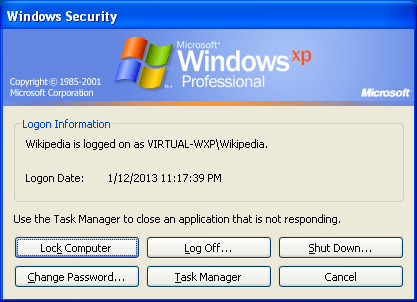

I suppose someone could be using an XP machine as a web server or a file server or even a print server. Look at what processes are running. Do you see any server-ish processes such as Apache? What ports are open? Is file and print sharing enabled?
Also, look at user accounts and shares. Browse around on the machine a bit. There should be some obvious tipoffs.


